Step-01 - catbox Project Setup - catbox-checkpoint-01
The catbox Project Setup Step-01 intent is to setup the resources and links for the catbox project. The INTENT for catbox – Create a mobile capapble site for a google spreadsheet.
Create catbox Project Setup for catbox-checkpoint-01
- Setup github repo catbox-repo
- Setup docs in repo catbox-repo-docs
- Setup readthedocs project catbox_docs
- Setup Gooogle Docs Sheet catbox-google-sheet
Create catbox react app:
catmini:dev cat$ npx create-react-app catbox
Should get output:
Success! Created catbox at /Users/cat/dev/catbox
Inside that directory, you can run several commands:

yarn start
    Starts the development server.

yarn build
    Bundles the app into static files for production.

yarn test
    Starts the test runner.

yarn eject
    Removes this tool and copies build dependencies, configuration files
    and scripts into the app directory. If you do this, you can’t go back!

We suggest that you begin by typing:

cd catbox
yarn start

Happy hacking!
Start the server:
catmini:dev cat$ cd catbox
catmini:catbox cat$ yarn start
Browse http://localhost:3000 - get the basic React site.
Crack open an editor and start coding.
Mod src/App.js
import React, { Component } from 'react';
import logo from './logo.svg';
import './App.css';
import CatList from "./componets/CatList";

class App extends Component {
render() {
    return (
    <div className="App">
        <header className="App-header">
        <img src={logo} className="App-logo" alt="logo" />
        <h1 className="App-title">Welcome to React</h1>
        </header>
        <CatList />
    </div>
    );
}
}

export default App;
Create src/componets/CatList.js
import React, { Component } from 'react';

class CatList extends Component {
    render() {
        return (
        <div>
            This will be the list of catcrap
        </div>
        );
    }
}

export default CatList;
- Setup Google Sheets API
- Create a new project called catboxList-google-project on catbox-create-google-project
- Enable “Google Sheets API” by going to “Go to APIs overview”
- Goto “Credentials” and “Create credentials”
- Click “Restrict Key” and set name to “catboxList”
- Under “Application Restrictions” set “HTTP referrers” and add “http://localhost:3000”
- Under “API Restrictions” select “Google Sheets API”
- create src/config.js save API key
Create src/config.js (see src/config.js.template)
export default {
    apiKey: "YOUR_API_KEY",
    discoveryDocs:
    ["https://sheets.googleapis.com/$discovery/rest?version=v4"],
    spreadsheetId: "spreadsheetId"
};
Add Google API to public/index.js after <div id=”root”></div>
    <title>catbox App</title>
</head>
<body>
    <noscript>
    You need to enable JavaScript to run this app.
    </noscript>
    <div id="root"></div>
    <script src="https://apis.google.com/js/api.js"></script>
Add window.gapi.load to componentDidMount in src/compnents/CatList.js suck in data and render
import React, { Component } from 'react';
import config from "../config";
import { load } from '../helpers/spreadsheet';

class CatList extends Component {

state = {
    pile: [],
    error: null
}

componentDidMount() {
    // 1. Load the JavaScript client library.
    window.gapi.load("client", this.initClient);
}

onLoad = (data, error) => {
    if (data) {
    const pile = data.items;
    this.setState({ pile });
    } else {
    this.setState({ error });
    }
};

initClient = () => {
    // 2. Initialize the JavaScript client library.
    window.gapi.client
    .init({
        apiKey: config.apiKey,
        // Your API key will be automatically added to the Discovery Document URLs.
        discoveryDocs: config.discoveryDocs
    })
    .then(() => {
    // 3. Initialize and make the API request.
    load(this.onLoad);
    });
};

render() {
    const { pile, error } = this.state;
    if (error) {
    return <div>{this.state.error}</div>;
    }
    return (
    <ul>
        {pile.map((item, i) => (
        <li key={i}>
            {item.colA} {item.colB} {item.colC}
        </li>
        ))}
    </ul>
    );
}
}

export default CatList;
Create src/helpers/spreadsheet.js
import config from "../config";
/**
* Load crap from the spreadsheet
* Get the right values from it and assign.
*/
export function load(callback) {
    window.gapi.client.load("sheets", "v4", () => {
        window.gapi.client.sheets.spreadsheets.values
        .get({
            spreadsheetId: config.spreadsheetId,
            range: "Sheet1!A4:T"
        })
        .then(
            response => {
            const data = response.result.values;
            const items = data.map(item => ({
                colA: item[0],
                colB: item[1],
                colC: item[2]
            })) || [];
            callback({
                items
            });
            },
            response => {
            callback(false, response.result.error);
            }
        );
    });
}
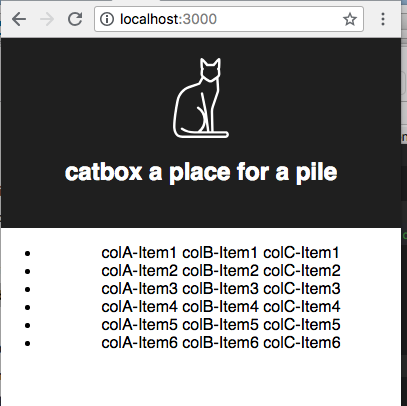
Now… browse http://localhost:3000 and should see a rendered list like this
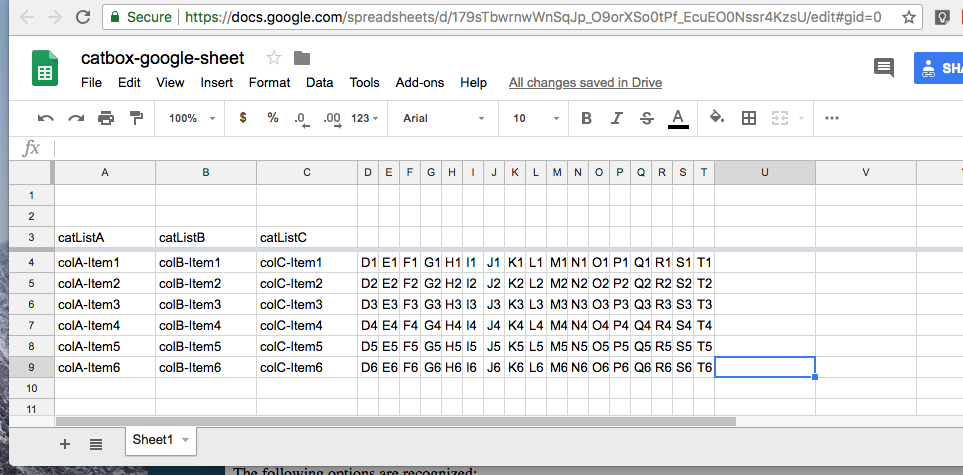
The data comes from catbox-google-sheet with the data in named version catbox-checkboint-01 seen belop
Produce catbox-checkpoint-01 catbox Project Setup
macci:catbox cat$ cd ~/bast23/catbox/docs
macci:docs cat$ vi source/catbox-dev-detail.rst (update doc)
macci:docs cat$ vi source/conf.py (Bump minor version to X.X.NN to match catbox-checkpoint-01)
macci:docs cat$ make html
macci:docs cat$ open build/html/index.html (verify docs)
macci:catbox cat$ cd ~/bast23/catbox
macci:catbox cat$ git add *
macci:catbox cat$ git commit -m "commit for catbox-checkpoint-01 - catbox Project Setup"
macci:catbox cat$ git tag catbox-checkpoint-01
macci:catbox cat$ git push
macci:catbox cat$ git push origin catbox-checkpoint-01
Verify checkpoint catbox-checkpoint-01
Resources